

 HOME CONTACT SUPPORT SENSORYTEST.COM
 | |||
|
|
HOME CONTACT SUPPORT SENSORYTEST.COM |
|
Sensory testing professional's favorite virtual desktop. Say hello to SIMS Cloud Systems. From any device, any laptop, any iPad and even your cell phone. Log in from anywhere anytime. Inquire today. 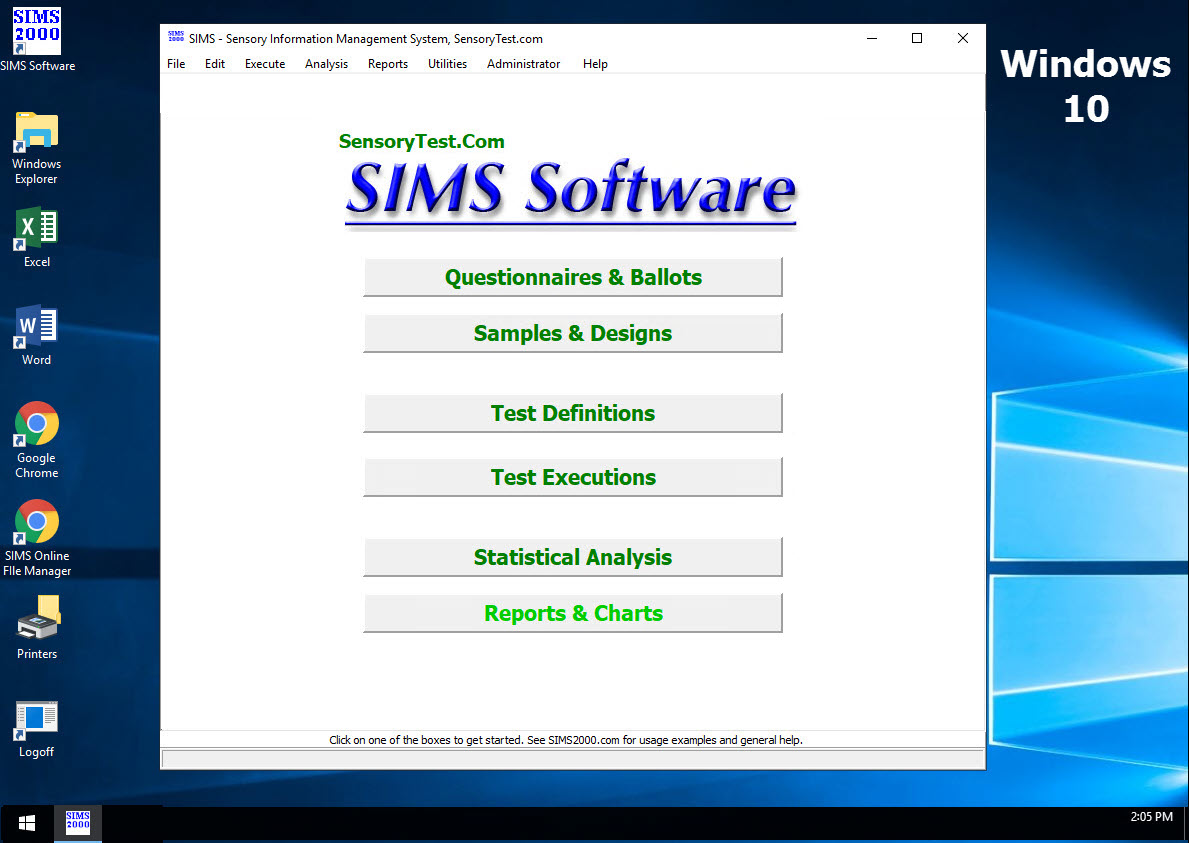
|
Mobile devices real test example Point your cell phone camera Easy for your respondents 
Link |
 VIEW REPORTS
 |
QUESTION CHOICES |
TEST CHOICES |
|
Index of this Web Page:
Test anywhere, anytime, and on any PC. SIMS Express Packages can be used to copy and transfer entire tests to & from SensoryTest.com and your in-house corporate systems. Example scenario - SensoryTest.com internet tests. SIMS Express Packages can be used to copy and transfer entire tests to & from traveling PCs and your in-house corporate systems. Example scenario - Traveling PC, Remote Office, or CLT, one or more PCs, no internet access. SIMS Express Packages, start here 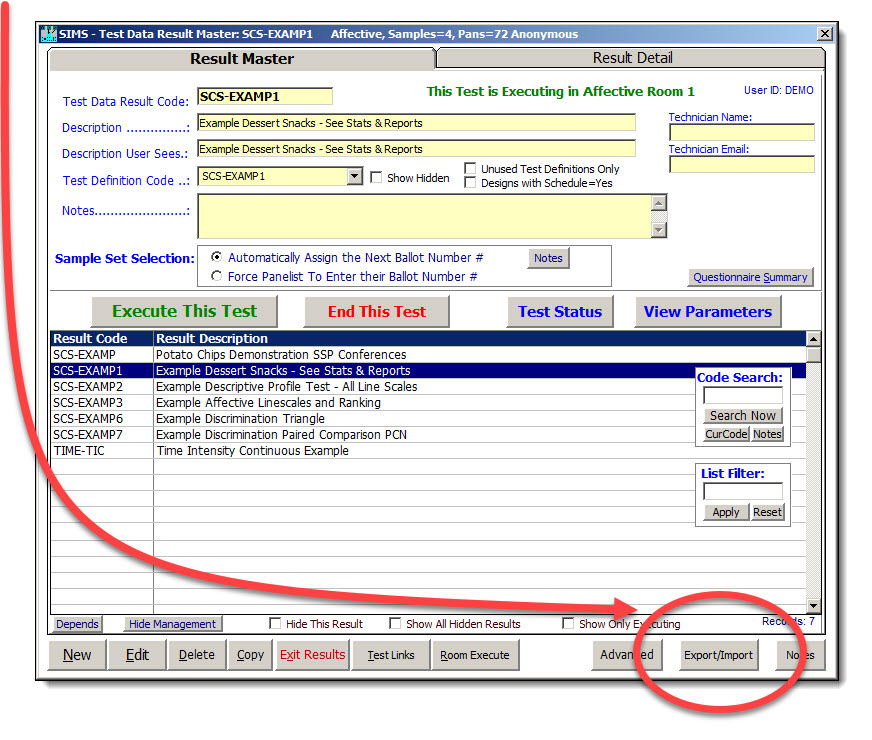
Introduction Tab #1 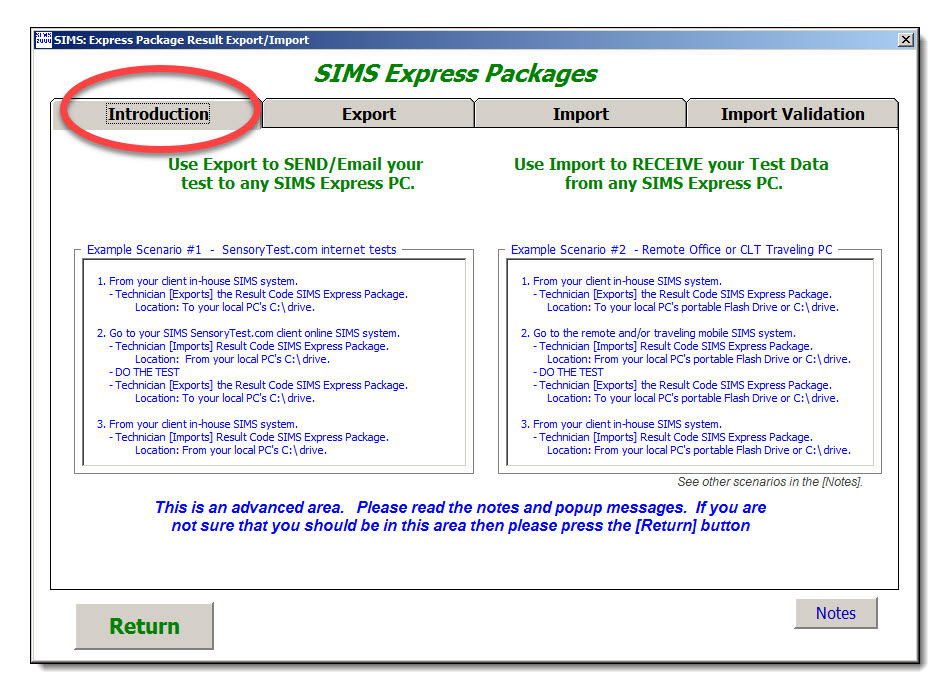
Export, Tab #2 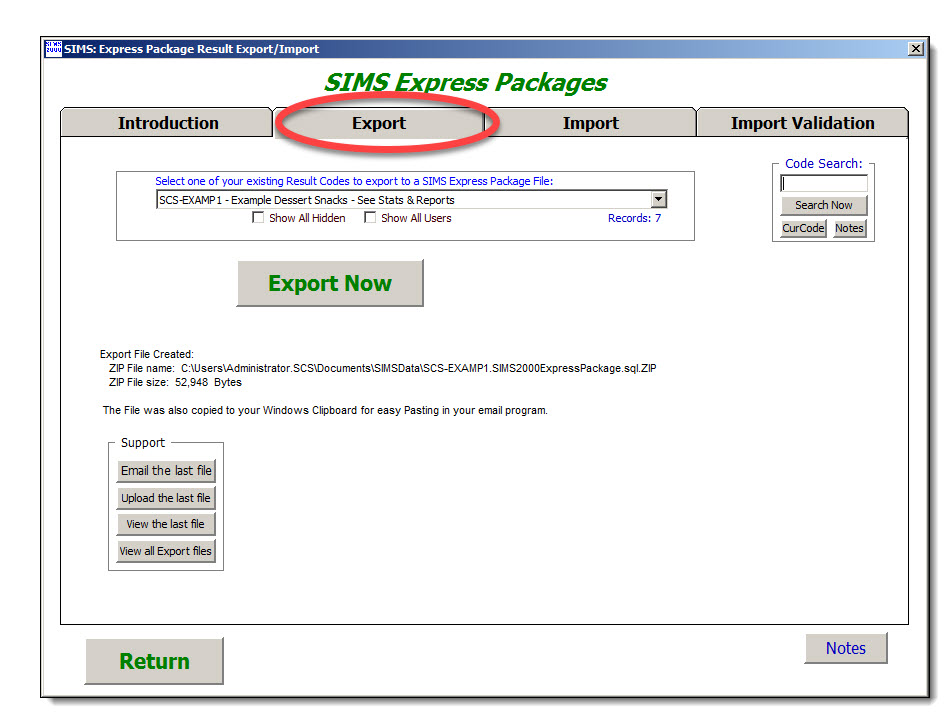
Import, Tab #3 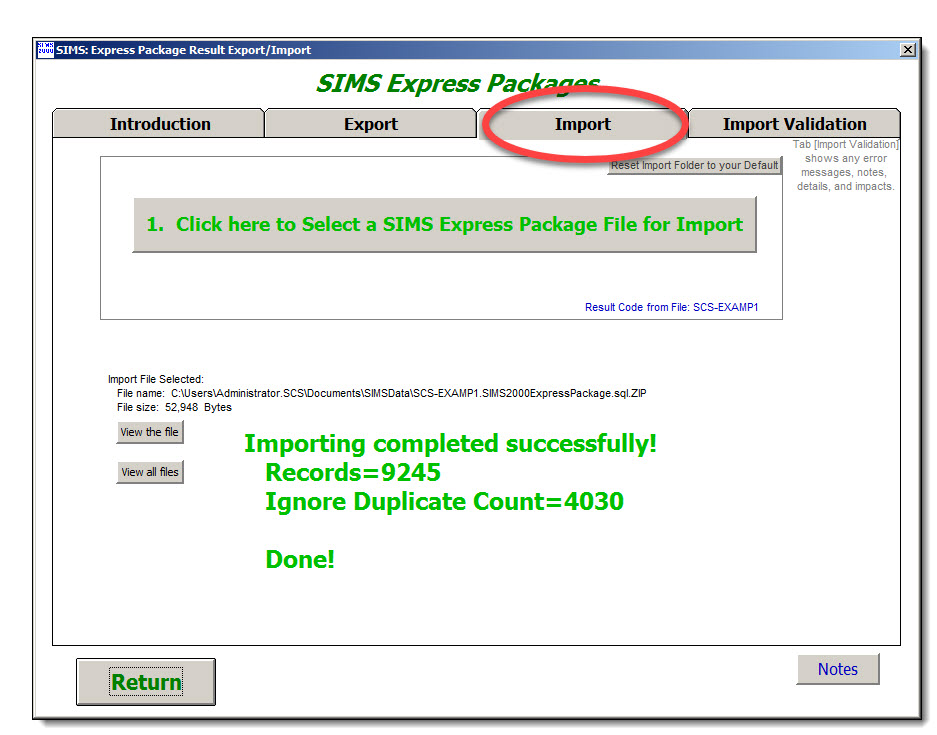
FAQ: I can't see my local PC folder with my SIMS Express Package Answer: When you connect to SIMS Online you need to share "Local Resources" "Drives" 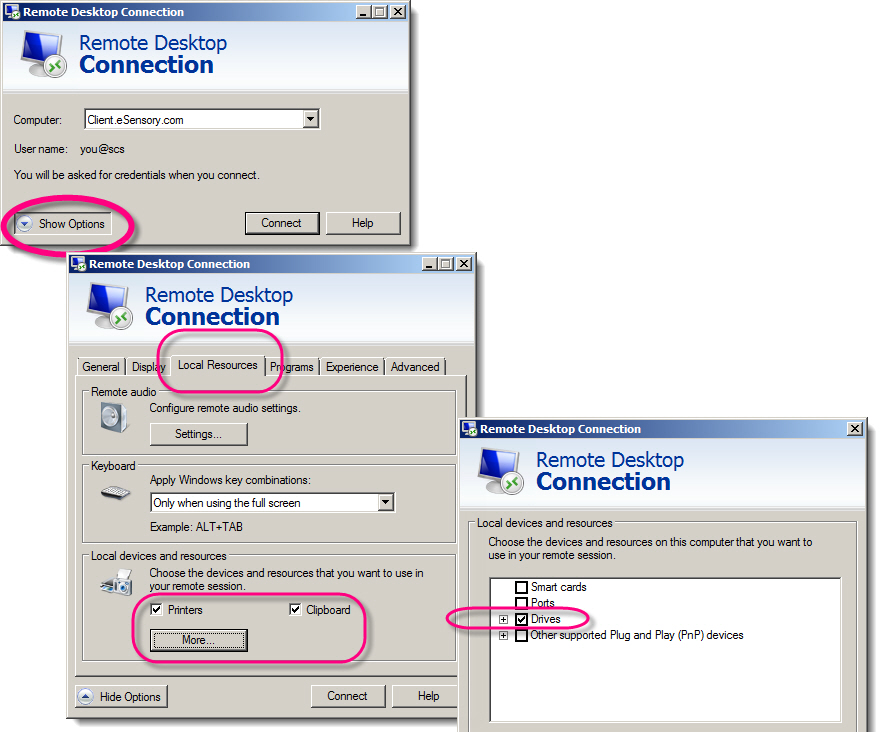
|
 ******  SIMS Express Packages  -  Notes  -  Export/Import   ******


   Test anywhere, anytime, and on any PC.

   SIMS Express Packages can be used to copy and transfer entire tests to & from SensoryTest.com and your in-house corporate systems.
            Example scenario - SensoryTest.com internet tests.

   SIMS Express Packages can be used to copy and transfer entire tests to & from traveling PCs and your in-house corporate systems.
           Example scenario - Traveling PC, Remote Office, or CLT, one or more PCs, no internet access.


  Export
  ------
    Use Export to SEND/Email your SIMS test to any SIMS Express PC.
    The Export file package is a complete SIMS Test Result Code, all of the test components and test panelist data.
        - The test components in the package include the entire SIMS test definition,
          sample rotation plans, questionnaires, experimental designs, experimental plans, etc.
        - The test data in the package includes the entire result data set, every panelist response up-to-the-minute.

  Import
  ------
    Use Import to RECEIVE your Test Data from any SIMS Express PC.
        Import is an easy 2 step process:
          1) Select the file for import, the SIMS express package.
             After selecting an Import File, see the next Tab named [Import Validation] to
             view any error messages, notes, details, and impacts.
          2) Import Now.  This will only be enabled if the verifications passed for the file selected above.

        Import Note: SIMS needs to be installed on the remote PC for Import.


  SIMS Express Packages can be used to copy and transfer entire tests to & from SensoryTest.com and your in-house corporate systems.
  SIMS Express Packages can be used to copy and transfer entire tests to & from traveling PCs and your in-house corporate systems.


  Example Scenario #1  -  SensoryTest.com internet tests
  ------------------------------------------------------

    1. From your client in-house SIMS system.
        - Technician Exports the Result Code SIMS Express Package.

    2. Go to your SIMS SensoryTest.com private client online SIMS system.
        - Technician Imports Result Code SIMS Express Package.
        - DO THE TEST
        - Technician Exports the Result Code SIMS Express Package.

    3. From your client in-house SIMS system.
        - Technician Imports Result Code SIMS Express Package.


  Example Scenario #2  -  Remote Office or CLT, one or more PCs, no internet access
  ---------------------------------------------------------------------------------

    1. From your client in-house SIMS system.
        - Technician Exports the Result Code SIMS Express Package.

    2. Go to the remote and/or traveling mobile SIMS system.
        - Technician Imports Result Code SIMS Express Package.
        - DO THE TEST
        - Technician Exports the Result Code SIMS Express Package.

    3. From your client in-house SIMS system.
        - Technician Imports Result Code SIMS Express Package.

    Note:  If your remote office or CLT has internet access available,
           then consider the simpler and popular alternative which is to use our
           SensoryTest.com internet, which is a easier since there's no need to
           exchange SIMS Express Packages and SIMS not needed on remote PCs.


  Usage Notes
  -----------


  Sample Set data redundancy and duplication avoidance.
    Import will not overwrite any existing data which occupies the exact same sample set.
    If you're going to run the same study in two places, use 'Force Panelist to Register Sample Set'
    which should insure unique sample set assignment and allow for successful imports.
      Example: You import a package file that used sample sets 1 thru 50, then later try
               to import another file, or even the same file, with same use 1-50 sample sets.
               SIMS is not able to overwrite the initially imported 1-50 sample sets.
      During Import Now, a count of ignored data records, if any, will be clearly shown on the screen.


  Import File verifications on the 4th tab show detailed information about the Import file selected.
     Details shown include File vs Database information, matching information with pre-exiting data notes.
     Also shown are the detailed header information from the top of the import file, this header section
     details the information from the source SIMS system where the import file was created.
     It is important for the target database system that if the test components already exist,
     that they properly match the details the source SIMS system where the import file was created.


  A SIMS Express PC is any PC running SIMS either as standalone system, such as
    traveling, mobile and/or portable PC comptuer system, or as networked PC on a local area Network.
    A traveling system will also need it's own SQL database such as the free SQL Express on our DVDs.


  Future enhancement plans for remote one-seat testing stations.
    We're planning on adding Export/Import SIMS Express Packages buttons to the
    Panelist PCs existing flexible reconfiguration capabilities, allowing for possible optional use of
    one-seat testing stations for virtually anywhere & anytime.  Simple copy/email the tests around as needed.
    The idea of one-seat testing stations is doable right now but needs the remote panelist to access
      SIMS like a technician, which is aok for your remote office locations, CLTs,
      and trained and/or trusted panelists, but not quite for home use consumers.


  This is an advanced area.   Please read the notes and popup messages.
    If you are not sure that you should be in this area then please proceed with caution.


  All data activity in this area is validated, audited and tracked.
|
| An alternative to SIMS Express Packages you can also just Copy a ballot. |
| Data hosting options are of your choosing. Hosting by you on your onsite company SQL data host and/or by our internet cloud based Software as a Service (SaaS). And whatever balance and combination of the two you need. If you need 100% onsite data host, or 100% Software as a Service (SaaS), or any combination of the two, it is your choice. Whatever you need. We deliver both solutions because clients frequently need both. For your everyday onsite tests you can choose to keep all of your valuable data 100% within your network (via free Microsoft SQL Express database for your data host which we can provide) where no internet is needed at all. Many clients do not want any of their data unnecessarily in the internet cloud unless absolutely necessary, and we totally agree. For those times when you want to run an internet based test, such as Home Use Test's (HUTs) and Central Location Tests (CLTs) we provide www.SensoryTest.com Software as a Service (SaaS). Same low SIMS Software price includes both platforms. |
When data hosted by SIMS Cloud Internet Software as a Service (SaaS) Your onsite locations and/or any offsite locations HUTs & CLTs |
Your professional technician's devices | Your panelist's & consumer's devices |
| Onsite Testing Client's testing rooms Central Location Testing CLTs Home Use Testing HUTs |
Professional access Microsoft Remote Desktop Virtualization Any PCs, Laptops, Tablets, Apple Macbooks, iPads SIMS software application hosted by Sensory Computer Systems www.SensoryTest.com |
Panelist access Any Browser Internet Access Chrome, Safari, Firefox, Microsoft Edge, MS Internet Explorer, etc. Any device PCs, Tablets, Apple Macbooks, iPads, iPhone, Mobile www.SensoryTest.com |
When data hosted at your onsite locations |
||
| Onsite Testing Client's testing rooms Microsoft SQL database hosted by client |
Office desktops, PCs, Laptops, Tablets SIMS software installed on PC, standard Windows client PC application |
Panel room PCs, Laptops, Tablets SIMS software installed on PC, standard Windows client PC application |